When a client's payment fails, they enter Past Due status. Their access to Sumung may be restricted. This article explains the steps to resolve a past-due situation.
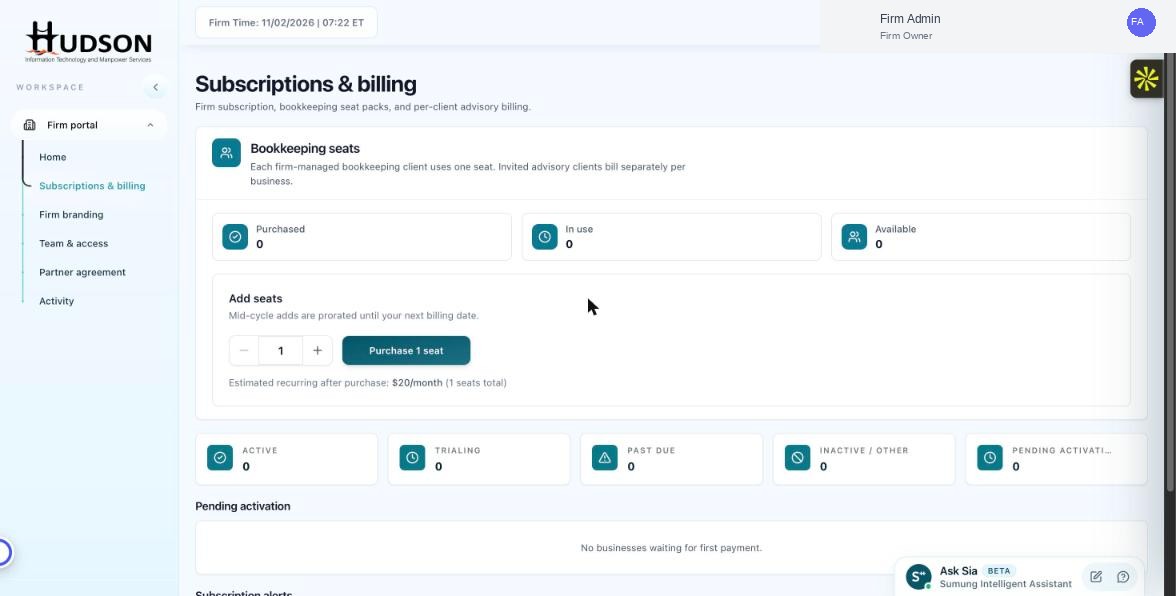
Subscriptions & billing — Past Due client metric
What You Can Do
- In the Subscriptions & billing dashboard, the Past Due metric card shows clients with failed payments.
- Click the Past Due card to see a filtered list of affected clients.
- For each past-due client, contact them to ask them to update their payment method in their Sumung account.
- You can also send a payment reminder email from the client's action menu (⋮).
- Once the client updates their payment info and the charge succeeds, their status changes back to Active.
- If the client cannot pay, you may need to deactivate their account to free up a seat.
💡 Good to Know: Past-due clients have limited access to the CFO12 app — they may not be able to create new transactions.
💡 Good to Know: Payment retries happen automatically on a schedule — manual re-billing may also be available.
Related Articles
Was this article helpful?
Your feedback helps us improve our documentation.