Bookkeeping seats determine how many client businesses your firm can manage in Sumung. Each bookkeeping client uses one seat. This article shows you how to purchase additional seats.
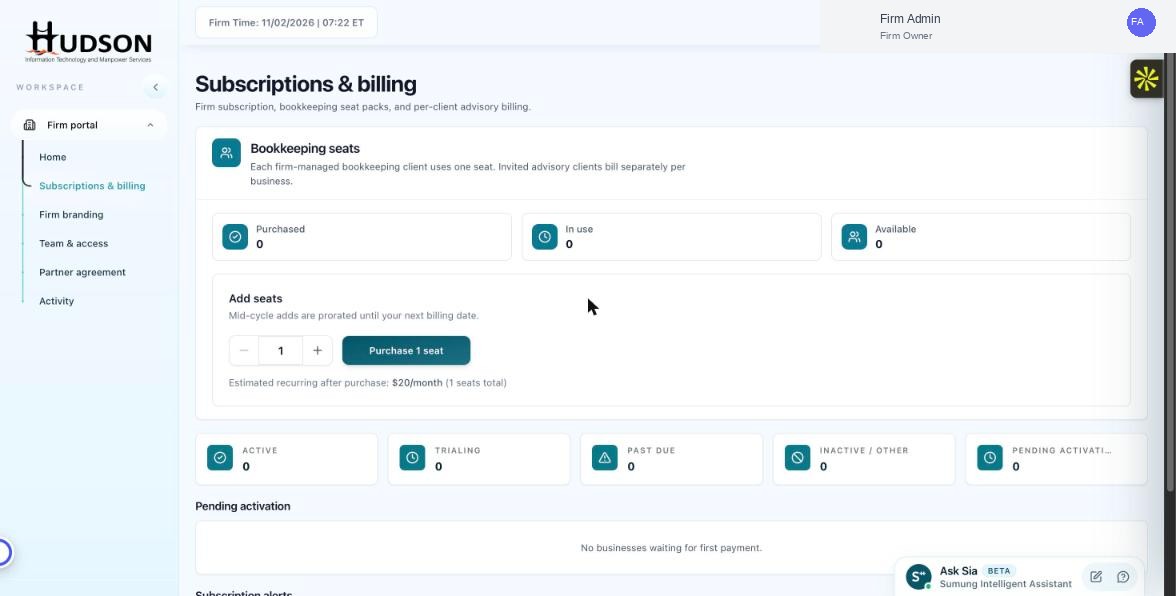
Subscriptions & billing — Add seats section
What You Can Do
- Navigate to Subscriptions & billing in the left sidebar.
- In the 'Bookkeeping seats' section, you will see your current Purchased, In use, and Available counts.
- Under 'Add seats', use the + / – buttons to select the number of seats you want to add.
- Review the estimated monthly cost shown below the quantity selector.
- Click 'Purchase X seat(s)' to complete the purchase.
- The new seats are available immediately and the cost is prorated for the current billing cycle.
💡 Good to Know: Mid-cycle seat additions are prorated to your next billing date — you pay only for the remaining days in the cycle.
💡 Good to Know: Seats are billed monthly as part of your firm subscription.
Related Articles
Was this article helpful?
Your feedback helps us improve our documentation.