If you need to update your firm's logo — for a rebrand or quality improvement — you can replace it at any time. This article explains how.
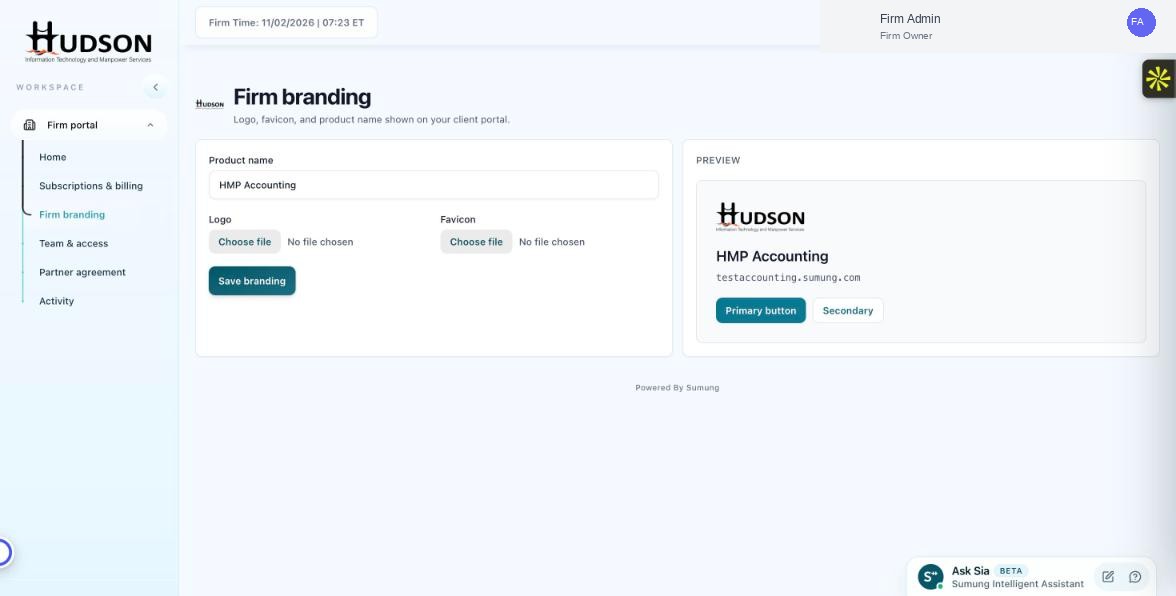
Logo section in Firm branding
What You Can Do
- Navigate to Firm branding.
- Under Logo, you will see 'No file chosen' if no logo is set, or the current logo filename.
- Click 'Choose file' to upload a new logo — this replaces any existing logo.
- Select the new logo file from your computer.
- Review the updated logo in the Preview panel.
- Click 'Save branding' to apply.
- The old logo is immediately replaced.
💡 Good to Know: There is no separate 'Remove logo' button — to remove a logo entirely, contact Sumung support.
💡 Good to Know: Verify the Preview looks correct before saving, especially aspect ratio and transparency.
Related Articles
Was this article helpful?
Your feedback helps us improve our documentation.