The Conversation tab in Ask Sia requires Sumung Pro (AI CFO). This article explains what Sumung Pro offers and how to upgrade.
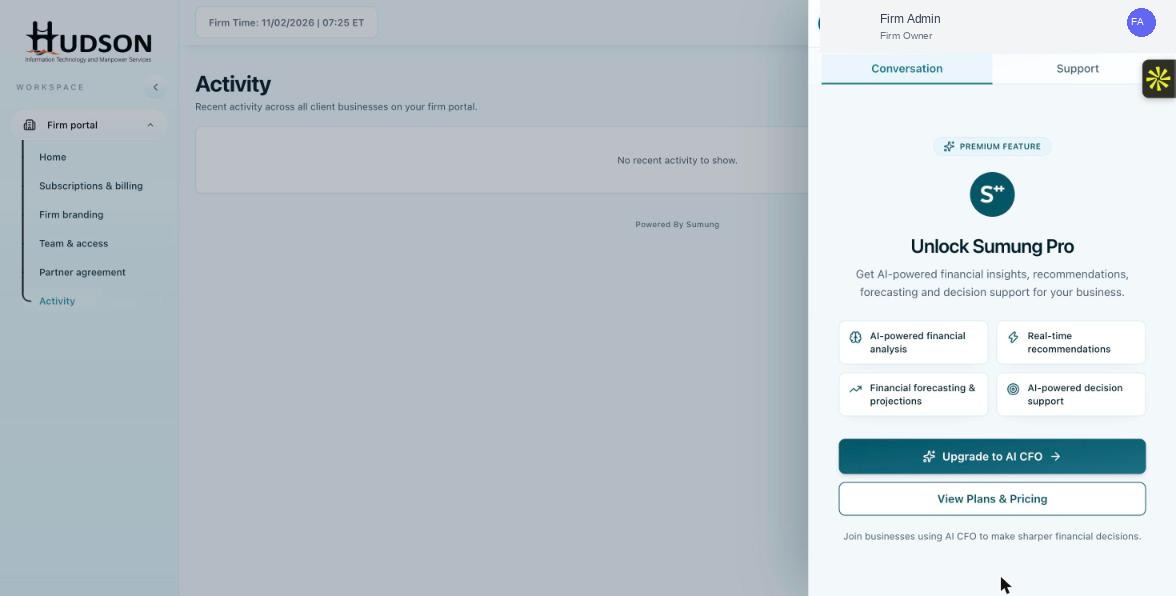
Ask Sia — Unlock Sumung Pro upgrade screen in Conversation tab
What You Can Do
- Click the Ask Sia button to open the panel.
- Click the 'Conversation' tab.
- If you see a 'PREMIUM FEATURE — Unlock Sumung Pro' screen, your plan does not include AI CFO.
- The panel shows the AI CFO features: AI-powered financial analysis, real-time recommendations, financial forecasting, AI-powered decision support.
- Click 'Upgrade to AI CFO' to begin the upgrade process.
- Alternatively, click 'View Plans & Pricing' to compare plans before committing.
- Complete the upgrade to unlock the Conversation tab.
💡 Good to Know: Sumung Pro (AI CFO) is separate from your bookkeeping seat subscription — it is an add-on.
💡 Good to Know: The Support tab is available on all plans and does not require Sumung Pro.
Related Articles
Was this article helpful?
Your feedback helps us improve our documentation.