The 'Billing Access' column in the Team & access list shows each staff member's level of access to billing information. This article explains the options.
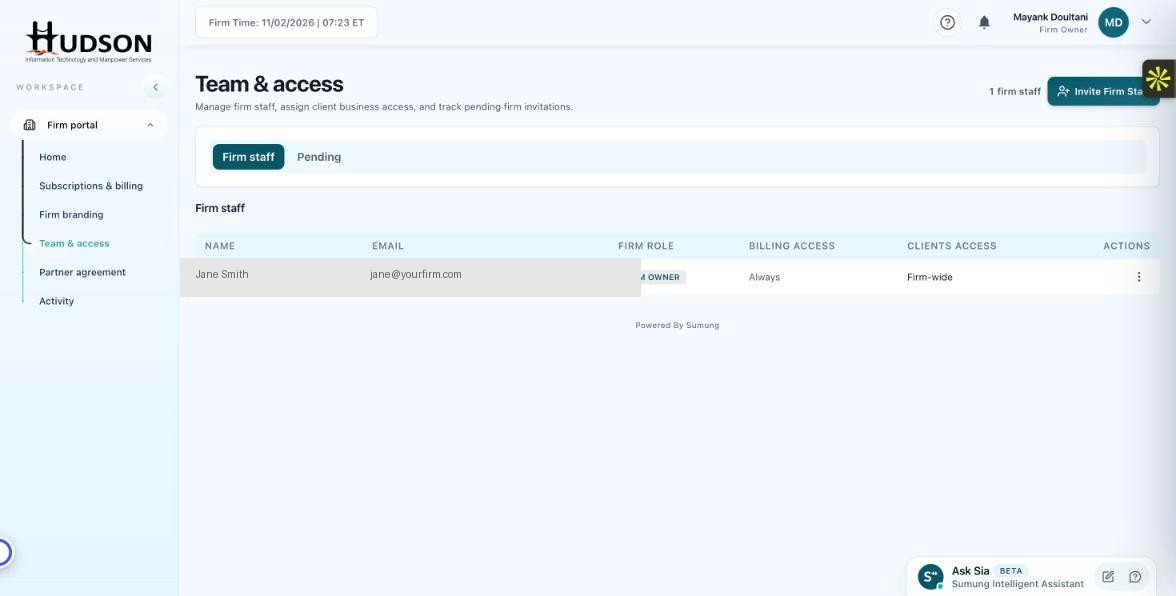
Team & access — Billing Access column in staff table
What You Can Do
- Navigate to Team & access.
- In the Firm staff table, find the 'Billing Access' column.
- The Firm Owner's billing access is set to 'Always' — this cannot be changed.
- For other staff, billing access can be set to: 'Always', 'Never', or 'Client-specific'.
- Restricting billing access for staff members prevents them from viewing subscription and payment details.
- To change a staff member's billing access, click their action menu (⋮) and select 'Edit permissions'.
💡 Good to Know: Best practice: restrict billing access to Owners and Admins to protect sensitive financial information.
💡 Good to Know: Staff with billing access can view but not change billing settings (unless they also have an Admin or Owner role).
Related Articles
Was this article helpful?
Your feedback helps us improve our documentation.