The 'Clients Access' column in Team & access controls whether a staff member can see all firm clients or only their assigned ones.
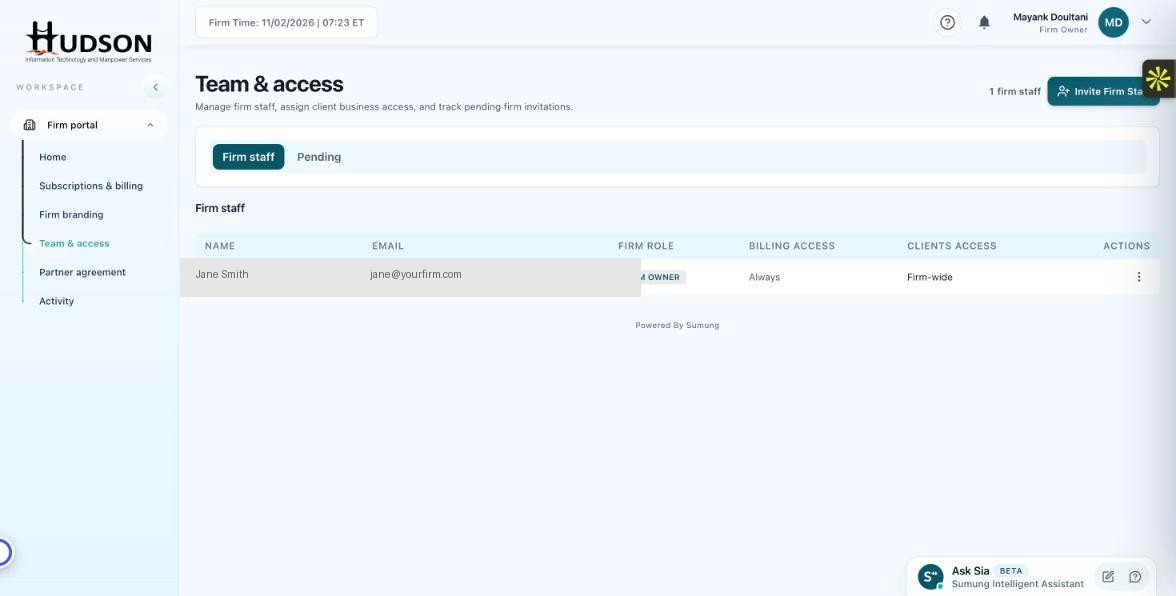
Team & access — Clients Access column in staff table
What You Can Do
- Navigate to Team & access.
- In the Firm staff table, find the 'Clients Access' column.
- Firm Owner: 'Firm-wide' — can see all clients.
- Staff with 'Firm-wide' access see all clients regardless of assignment.
- Staff with 'Assigned only' access see only clients explicitly assigned to them.
- To change this setting, click the staff member's action menu (⋮) and select 'Edit permissions'.
💡 Good to Know: Use 'Assigned only' for staff members with focused client lists to prevent unauthorized access to other clients' data.
💡 Good to Know: 'Firm-wide' access is appropriate for Admins and senior staff who need oversight of all accounts.
Related Articles
Was this article helpful?
Your feedback helps us improve our documentation.